Trading on Ethereum with Bloom: Gas, Blocks, and MEV Explained
Trading on Ethereum differs from Solana at every layer: block structure, fee market, attacker surface. Each difference shapes how your Bloom EVM bot...
Trading on Ethereum differs from Solana at every layer: block structure, fee market, attacker surface. Each difference shapes how your Bloom EVM bot behaves. This guide explains what happens under the hood and how Bloom turns it into the settings you use.
How Ethereum processes your trade
Ethereum proposes a new block every 12 seconds, carrying on average 200 to 400 transactions depending on demand.
Your trade enters the mempool, a public pool of pending transactions. Validators pick from it based on the priority fee you pay. Competitive fees land in the next block. Below-market fees wait, or get dropped.
Warning:
An Ethereum transaction that does not meet the current fee requirement fails or remains pending. Paying below market is not "cheaper", it is non-execution.
Gas, Gwei, and gas limit
Gas is the unit of computational work on Ethereum. Every operation, from transfer to swap, consumes gas.
Gwei prices gas. 1 Gwei equals 0.000000001 ETH. Setting gas to "3 Gwei" in Bloom sets the price per unit of gas.
Gas limit is the maximum gas you authorize a transaction to consume. Bloom defaults to 250,000 units for EVM swaps, enough for most token interactions.
Your final cost in ETH is a single conversion:
Gas Cost (ETH) = Gas Limit × Gas Price (Gwei) × 10⁻⁹
The × 10⁻⁹ factor converts Gwei to ETH, since 1 Gwei equals 10⁻⁹ ETH.
Buy/Sell Tip: We suggest to set a _minimum of 0.001 ETH.
EIP-1559: base fee and priority fee
Since the London Hard Fork, Ethereum fees have two components:
- –Base Fee. Set by the protocol per block. Burned.
- –Priority Fee. Set by you. Paid to the validator.
Base fee is algorithmic: up when blocks are full, down when empty. You cannot control it. Priority fee is your tip to the validator for inclusion.
Max Fee is the cap per gas unit. If base plus priority exceeds it, the transaction stalls until base fee drops.
How Bloom handles gas
Bloom abstracts EIP-1559: you set only the priority fee. Base fee is read live from the latest block, Max Fee is computed with a safety buffer.
Max Fee = Base Fee + (Priority Fee × 2)
The doubled priority is a cap that absorbs base fee spikes mid-transaction, not a multiplier on your real cost. In steady conditions you pay base fee plus priority fee once.
Tools to price gas correctly:
- –Blocknative Gas Estimator. Live base fee and recommended priority fees. blocknative.com/gas-estimator.
- –Bloom Discord /gas command. Total cost estimate using a 250,000 gas limit plus current base fee. Input your intended priority fee to read it back.
Note. /gas reflects base fee at query time. If base fee moves before your trade, your cost moves with it.
MEV and sandwich attacks
MEV (Maximal Extractable Value) is profit that validators and bots extract by reordering, including, or excluding transactions in a block. The attack that hits retail hardest is the sandwich.
How it works:
- –You submit a buy with some slippage tolerance.
- –A bot spots your pending transaction in the mempool.
- –The bot buys in front of you, pushing the price up.
- –Your transaction executes at the inflated price.
- –The bot sells after, capturing the spread. You eat the slippage.
On Ethereum this is routine. Public mempools are scanned continuously by specialized bots.
Bloom's MEV Protection. MEV Protect is ON by default on Bloom EVM. Enabled, your transactions route through BloXroute, a private relay that hides them from the public mempool until the validator includes them. Disabled, they go through a custom public node: slightly faster, fully visible.
Warning: Do not disable MEV Protect without a specific reason. The speed gain rarely compensates for the slippage loss on a sandwiched trade.
Honeypots: check before buying
A honeypot is a token you can buy but cannot sell. The contract hides a blacklist, a transfer block, or a sell tax that spikes to 100% at sell time, trapping your funds while the scammer drains liquidity.
Honeypots are common on Ethereum because ERC-20 contracts allow arbitrary transfer logic. Verify before buying:
- –Tax (Buy / Sell). Reasonable buy tax with a prohibitive sell tax is the classic honeypot pattern.
- –Liquidity. Very low or freshly deployed liquidity is a red flag.
- –Contract audit. Run the address through a honeypot scanner when in doubt.
Supported DEXes
<u>Supported DEXes</u>
Bloom's EVM bot routes Ethereum trades across every Uniswap protocol version, against three quote tokens:
- –Uniswap v2. WETH, USDT, USDC.
- –Uniswap v3. WETH, USDT, USDC.
- –Uniswap v4. WETH, USDT, USDC.
You do not pick the version manually. Bloom routes through the liquidity that matches your swap.
Buying on Ethereum with Bloom: the Approve step
On Solana a swap is one instruction. On Ethereum, ERC-20 tokens require an Approve transaction before any contract can move them for you. The first time you interact with a token, Bloom must approve it before selling or transferring.
- –Bloom sends an Approve, authorizing the router to move that token from your wallet.
- –Once confirmed, the token trades normally.
Approve is a separate on-chain transaction and costs gas. Bloom exposes a dedicated Approve Gas setting so you can keep approve cheap while spending more on time-sensitive swaps.
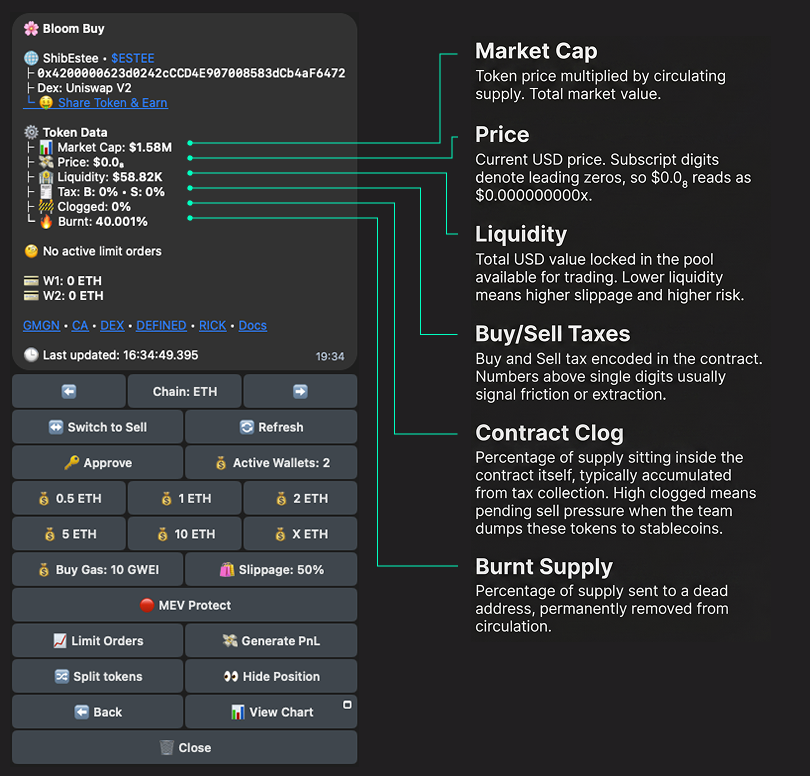
Reading the Token Data card
When Bloom surfaces a token, the data block shows the following fields:
- –Market Cap. Price multiplied by circulating supply. Total market value.
- –Price. Current USD price. Subscript digits denote leading zeros: $0.0₈ reads as $0.000000000x.
- –Liquidity. USD locked in the pool available for trading. Lower liquidity means higher slippage and higher risk.
- –Tax B / S. Buy and Sell tax encoded in the contract. Above single digits usually signals friction or extraction.
- –Clogged. Percentage of supply sitting inside the contract, usually accumulated from tax. High clogged means pending sell pressure when the team dumps it.
- –Burnt. Percentage of supply sent to a dead address, permanently removed from circulation.
This card is your first filter. Tax, Liquidity, and Clogged are the three numbers that tell you most of what you need to know before the first click.
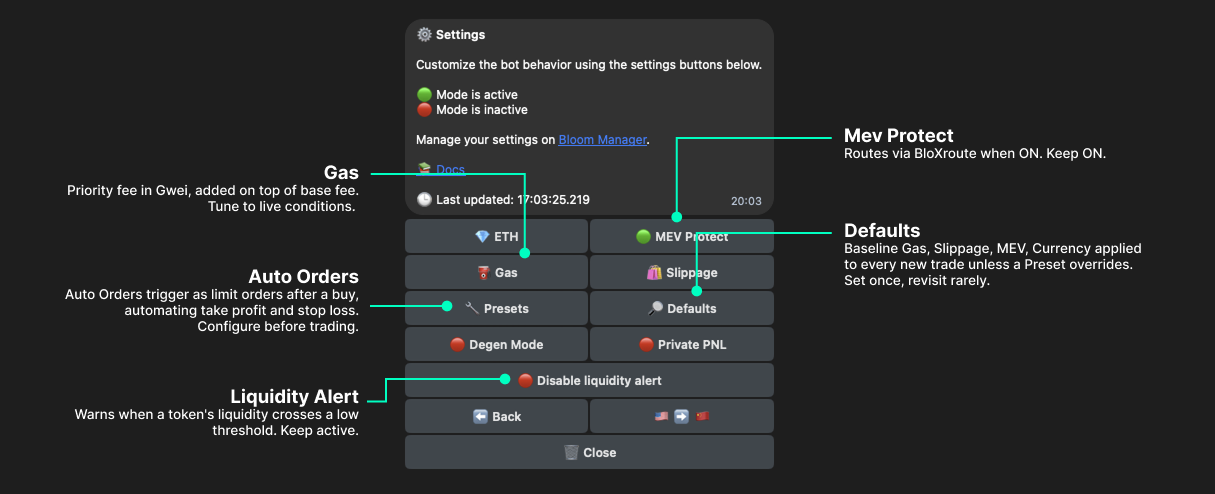
Bloom settings that shape your EVM trading
- –Gas. Priority fee in Gwei, added on top of base fee. Tune to live conditions.
- –MEV Protect. Routes via BloXroute when ON. Keep ON.
- –Presets. Saved parameter sets for Buy, Sell, Auto Orders, Copy, AFK, Twitter. Auto Orders trigger as limit orders after a buy, automating take profit and stop loss. Configure before trading.
- –Defaults. Baseline Gas, Slippage, MEV, Currency applied to every new trade unless a Preset overrides. Set once, revisit rarely.
- –Liquidity Alert. Warns when a token's liquidity crosses a low threshold. Keep active.
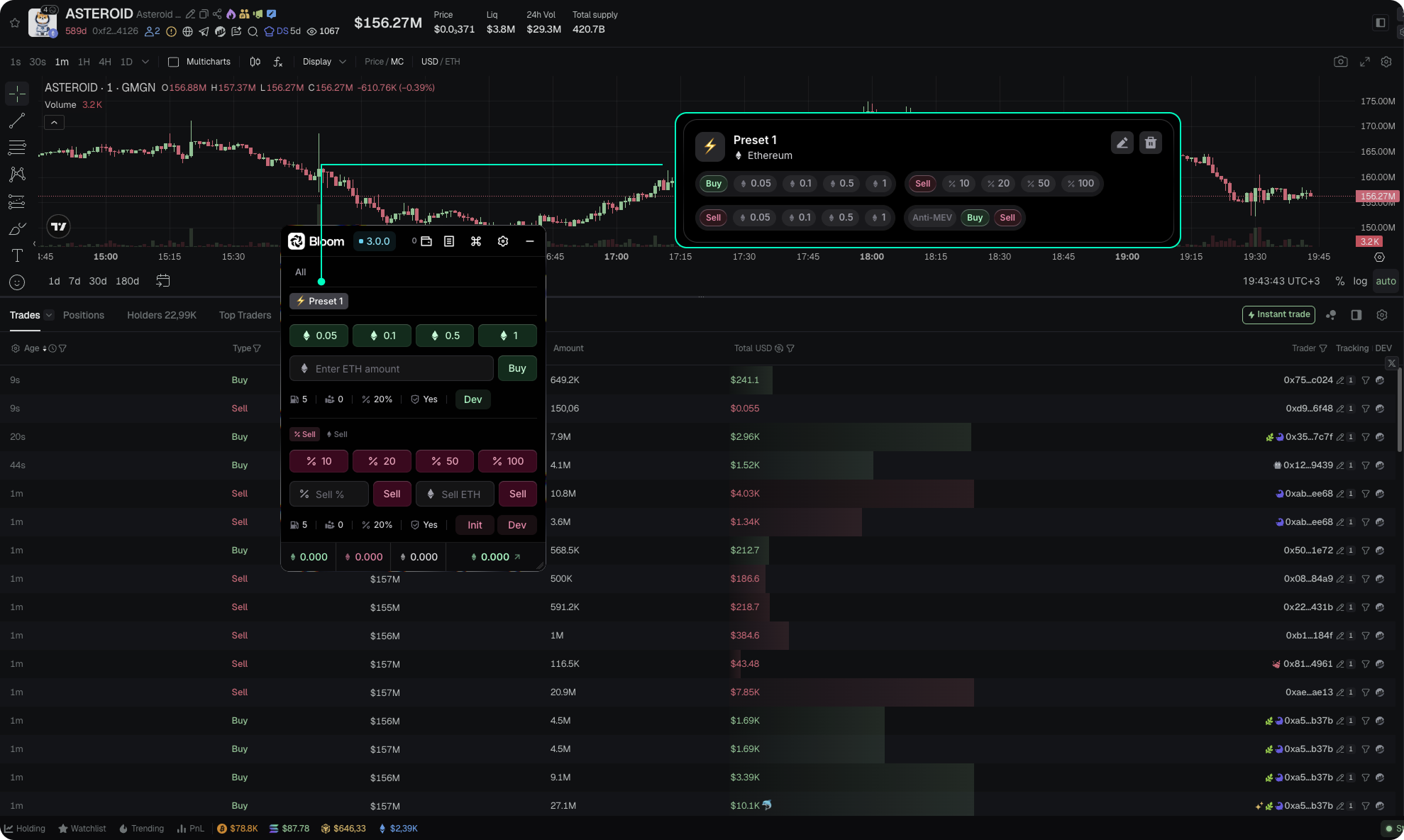
Bloom Extension on Ethereum
If you already run a preferred terminal, chart tool, or scanning platform, Bloom Extension layers on top. You keep your workflow, your platform, your charts. Bloom handles the execution.
The extension works on every Ethereum pair the bot supports. Find a token on your platform, trigger the trade from the Bloom panel, and the swap executes with Bloom's gas routing and MEV protection.
The short version
Ethereum punishes inattentive traders. Gas is dynamic, blocks fill fast, MEV bots scan the mempool nonstop, honeypots are seeded daily. Bloom's EVM bot covers each surface with opinionated defaults, but defaults only help if you know what they defend against.
- –Check current gas before trading, using /gas or Blocknative.
- –Keep MEV Protect ON.
- –Read the Token Data card before every buy.
- –Approve once, trade many times.
- –Tune Presets to your strategy, not the market's mood.